I have taken the baseline beacons that I have created for QRSS, WSPR and Opera and put them together into a single beacon.
WSPR is on a 10 minute cycle (TX Percent = 20%). QRSS follows and just sends my call sign. Opera then follows and the remainder of the 10 minute cycle is idle. WSPR goes first because it has the even minute starting time requirement.
I have created each of the beacons as separate objects that the main beacon code can instantiate and call. The main beacon code looks like this:
CON
_CLKMODE = XTAL1 + PLL16X
_XINFREQ = 5_000_000
WMin = 381 'WAITCNT-expression-overhead Minimum
OBJ
WSPR : "ko7mBeaconWSPR"
QRSS : "ko7mBeaconQRSS"
Opera : "ko7mBeaconOpera"
Clock : "ko7mClock"
Freq : "Synth"
VAR
LONG Sync
PUB Main
doInitialize
repeat
WSPR.doBeacon ' 2 minutes (110.6 seconds) for WSPR
delay(10000) ' Delay 10 seconds before doing QRSS
QRSS.doBeacon ' QRSS is about 3 minutes
delay(10000) ' Delay 10 seconds before doing Opera
Opera.doBeacon ' Opera is about 3 minutes
repeat while Clock.getSeconds // Sync
delay(100)
PUB doInitialize
Sync := 10 * 60 ' Beacons cycle every 10 minutes
Clock.Start
PUB delay(Duration)
waitcnt(((clkfreq / 1_000 * Duration - 3932) #> WMin) + cnt)
The beacon is up and running as of now. I would love to have any reports if anyone is able to spot any of my three beacons.
Tuesday, January 31, 2012

Randomizing WSPR TX Percent - revisited
After 12 hours or so of experiencing my recent changes to how often my WSPR beacon transmits, I have decided that I am not happy with the results. As mentioned in my previous posting my recent changes have redefined TX Percent to mean the maximum amount of time that the beacon will wait between transmissions. This is not quite right because as you can see it results in an aweful lot of transmissions when the intent is to transmit "about every 10 minutes" when TX Percent is set to 20%.

I think clearly that the intent from Joe Taylor's WSPR documentation is that we actually transmit approximately every 10 minutes in this case, but that we randomly choose which 2 minute window in that 10 minutes to transmit.
So, to implement this, I need a couple of time values. The transmission time calculated from TX Percent and a randomly chosen two minute interval in that timeframe. The nextSync calculation will need changing to first wait for the randomly chosen period to arrive, transmit the symbol stream and then a wait for the remainder of the time calculated by TX Percent. The modified code looks like this:
PUB nextSync : s
s := ROUND(1.0 / TXPercent * 2.0) ' Calculate when next occurs in minutes
case interval
Random:
s := (||?Rnd // s) ' Randomize the result
interval := Calculated ' Next time use the calculated value
Calculated:
s -= (Sync / 60) ' Wait the remainder of calculated time
interval := Random
s += (s // 2) ' Send on a 2 minute boundary
s *= 60 ' Convert minutes to seconds
The overall effect of this is going to be to randomize the first transmission start time whilst the second will always land on the calculated TX Percent time slot. So, every other transmission will be exacly 10 minutes aligned at TX Percent of 20%.
I am not certain this is exactly what I want either, but I will give it a go and see how I like the new effect. If it does not suit me, I will go with choosing a random slot in the 10 minute window, then waiting until the end of the 10 minute window and choosing a new random slot in the next 10 minute window. The potential negative on that solution is that we could wait up to 20 minutes if the random generator chose the first 2 minute slot and then chose the last 2 minute slot in the next 10 minute window. Sort of the opposite problem I currently have. Anyone have any thoughts on this?
After much ado about nothing, I have settled on the following implementation (as much as anything is ever "settled"):
PUB nextSync : s
s := ROUND(1.0 / TXPercent * 2.0) ' Calculate when next occurs in minutes
if interval++ & 1
s := (||?Rnd // s) + 1 ' Randomize the result
s += (s // 2) ' Aalways send on a 2 minute boundary
s *= 60 ' Convert minutes to seconds
The effect is clear enough. I randomize every other transmission. Simple enough and not being such a hog of WSPR bandwidth. The interval variable is a BYTE value that gets incremented every time we calculate the next transmission time. The least significant bit determines if we use a random or calculated next transmission time.
<Insert 3/4 of a day delay here>
So, I have reverted back to a mode where I transmit every N minutes based on TX Percent calculation only. I decided I really didn't like having the randomizing in there and have commented it out. There is sufficient randomness of folks using the same TX Percent value starting at different 2 minute timeslots and then carrying on at a consistent period for my liking. If I find I am syncing with another station that I want to copy, I can delay my start by a time slot and solve the problem that way. Bit of a wasted exercise, but so be it.

I think clearly that the intent from Joe Taylor's WSPR documentation is that we actually transmit approximately every 10 minutes in this case, but that we randomly choose which 2 minute window in that 10 minutes to transmit.
So, to implement this, I need a couple of time values. The transmission time calculated from TX Percent and a randomly chosen two minute interval in that timeframe. The nextSync calculation will need changing to first wait for the randomly chosen period to arrive, transmit the symbol stream and then a wait for the remainder of the time calculated by TX Percent. The modified code looks like this:
PUB nextSync : s
s := ROUND(1.0 / TXPercent * 2.0) ' Calculate when next occurs in minutes
case interval
Random:
s := (||?Rnd // s) ' Randomize the result
interval := Calculated ' Next time use the calculated value
Calculated:
s -= (Sync / 60) ' Wait the remainder of calculated time
interval := Random
s += (s // 2) ' Send on a 2 minute boundary
s *= 60 ' Convert minutes to seconds
The overall effect of this is going to be to randomize the first transmission start time whilst the second will always land on the calculated TX Percent time slot. So, every other transmission will be exacly 10 minutes aligned at TX Percent of 20%.
I am not certain this is exactly what I want either, but I will give it a go and see how I like the new effect. If it does not suit me, I will go with choosing a random slot in the 10 minute window, then waiting until the end of the 10 minute window and choosing a new random slot in the next 10 minute window. The potential negative on that solution is that we could wait up to 20 minutes if the random generator chose the first 2 minute slot and then chose the last 2 minute slot in the next 10 minute window. Sort of the opposite problem I currently have. Anyone have any thoughts on this?
After much ado about nothing, I have settled on the following implementation (as much as anything is ever "settled"):
PUB nextSync : s
s := ROUND(1.0 / TXPercent * 2.0) ' Calculate when next occurs in minutes
if interval++ & 1
s := (||?Rnd // s) + 1 ' Randomize the result
s += (s // 2) ' Aalways send on a 2 minute boundary
s *= 60 ' Convert minutes to seconds
The effect is clear enough. I randomize every other transmission. Simple enough and not being such a hog of WSPR bandwidth. The interval variable is a BYTE value that gets incremented every time we calculate the next transmission time. The least significant bit determines if we use a random or calculated next transmission time.
<Insert 3/4 of a day delay here>
So, I have reverted back to a mode where I transmit every N minutes based on TX Percent calculation only. I decided I really didn't like having the randomizing in there and have commented it out. There is sufficient randomness of folks using the same TX Percent value starting at different 2 minute timeslots and then carrying on at a consistent period for my liking. If I find I am syncing with another station that I want to copy, I can delay my start by a time slot and solve the problem that way. Bit of a wasted exercise, but so be it.
Microscope for the bench
I have fought long and hard, mostly with my own pride and have finally admitted to myself that my eyesight is not what it once was. The first indication of that came with my driver's license and airman's medical that reads "Must have corrective lenses available for near vision" on the back. Oh sigh...
Trying to work with SMT electronics has been mostly an exercise in frustration simply because I cannot sufficiently see what I am doing. So, I recently aquired a binocular microscope for the bench.

Man, what a difference this makes! I can now actually see what I am doing even whilst soldering TQFP or other dense, fine pitch SMT components. Even with corrective lenses, I have trouble with anything smaller than 1206 SMT components. Since most of my components are 0805, this is a problem.

This is such a simple solution. It actually has made homebrew electronics pleasurable for me again. If you are struggling as I have with changes in vision as I have grown "wiser" (older) don't waste another minute pondering the purchase. Invest the money in such a device and see what you are doing, or at least what you have been missing! They are not cheap, but believe me, they are worth every penny you spend and will repay itself many times over.
Trying to work with SMT electronics has been mostly an exercise in frustration simply because I cannot sufficiently see what I am doing. So, I recently aquired a binocular microscope for the bench.

Man, what a difference this makes! I can now actually see what I am doing even whilst soldering TQFP or other dense, fine pitch SMT components. Even with corrective lenses, I have trouble with anything smaller than 1206 SMT components. Since most of my components are 0805, this is a problem.
This is such a simple solution. It actually has made homebrew electronics pleasurable for me again. If you are struggling as I have with changes in vision as I have grown "wiser" (older) don't waste another minute pondering the purchase. Invest the money in such a device and see what you are doing, or at least what you have been missing! They are not cheap, but believe me, they are worth every penny you spend and will repay itself many times over.
Randomizing WSPR TX Percent
My propeller WSPR beacon so far has implemented TX Percent as a constant. For example if you set TXPercent to 20% (0.20) then it will transmit every 10 minutes. Joe Taylor's WSPR specification states that in reality, it should transmit randomly within that interval in order to minimize collisions with other stations transmitting with the same TX Percent value. So rather than transmitting exactly every 10 minutes with this TX Percent value, I have implemented a routine to pick a random 2 minute period up to the value specified by TX Percent. So, TX Percent now effectively specifies the maximum amount of time to wait between transmissions.
I created a variable to hold the current random number and initialized it with a constant. The value of the constant is not important. Pick your birthday or whatever. It becomes the starting seed for the random number generator.
VAR
LONG Rnd
PUB doInitialize
Rnd := 22041956 ' Initialize random number seed
I then created a new procedure to calculate how long to wait before the next transmission based on TX Percent. TX Percent is declared as a constant. For me it is set to 20%
CON
TXPercent = 0.20 ' Transmit 20% of the time or about every 10 minutes
PUB nextSync : s
s := ROUND(1.0 / TXPercent * 2.0) ' Calculate when next xmit occurs in minutes
s := (||?Rnd // s) ' Randomize the result
s += (s // 2) ' Send on a 2 minute boundary
s *= 60 ' Convert minutes to seconds
Right. Now, in the main loop, we calculate how long to wait with each go by calling nextSync and setting the new value of Sync to the returned value.
PUB Main
doInitialize
repeat
'Send symbol set for KO7M CN87 7
sendCode(@mySyms)
noTone
Sync := nextSync
repeat while SecondCnt // Sync
delay(100)
This seems to do the job nicely. While it is not always the case that you may want to have the transmission start time randomized, this brings the beacon code closer to that of the WSPR 2.x specification. If you wish to have constant transmission periods, just change the Sync := nextSync line to set Sync to a constant number of seconds between transmissions. Remember to make sure this equates to an even number of minutes between transmissions.
As you can see, my transmissions are now being nicely randomized up to 10 minutes.

For those interested, here is the entire updated beacon code:
CON
_CLKMODE = XTAL1 + PLL16X
_XINFREQ = 5_000_000
WMin = 381 'WAITCNT-expression-overhead Minimum
RFPin = 27 ' I use pin 27 for RF output
' WSPR standard frequencies
' Shown are the dial frequencies plus 1500 hz to put in the middle of
' the 200 hz WSPR band
WSPR500KHz = 502_400 + 1_500 ' 500 KHz
WSPR160M = 1_836_600 + 1_500 ' 160 metres
WSPR80M = 3_592_600 + 1_500 ' 80 metres
WSPR60M = 5_287_200 + 1_500 ' 60 metres
WSPR40M = 7_038_600 + 1_500 ' 40 metres
WSPR30M = 10_138_700 + 1_500 ' 30 metres
WSPR20M = 14_095_600 + 1_500 ' 20 metres
WSPR17M = 18_104_600 + 1_500 ' 17 metres
WSPR15M = 21_094_600 + 1_500 ' 15 metres
WSPR12M = 24_924_600 + 1_500 ' 12 metres
WSPR10M = 28_124_600 + 1_500 ' 10 metres
WSPR6M = 50_293_000 + 1_500 ' 6 metres
WSPR4M = 70_028_600 + 1_500 ' 4 metres
WSPR2M = 144_489_000 + 1_500 ' 2 metres
Frequency = WSPR30M ' Set to 30 metres
ErrorOffset = 20 ' Specific to my propeller board - change this
symbolLength = 683 ' 8192 / 12000 * 1000 = milliseconds
TXPercent = 0.20 ' Transmit 20% or about every 10 minutes
OBJ
Freq : "Synth"
'WSPR : "ko7mWSPREncode"
'T : "PSM_tv_text"
VAR
LONG SecondCnt, Stack[16]
LONG Sync
LONG Rnd
DAT
' Symbol set for KO7M CN87 7
mySyms BYTE "33020202322033300230030333100222201023012020023033"
BYTE "22132320011212000112303210300300303300031212302010"
BYTE "22021203023312132013030201132002230302330002020310"
BYTE "303320231002", 0
PUB Main
doInitialize
repeat
'Send symbol set for KO7M CN87 7
sendCode(@mySyms)
noTone
Sync := nextSync
repeat while SecondCnt // Sync
delay(100)
PUB doInitialize
Rnd := 22041956 ' Initialize random seed
cognew(Clock, @Stack) ' Start the clock COG
PUB sendCode(stringptr)
if TXPercent > 0 ' If zero, not transmitting
repeat strsize(stringptr)
sendSymbol(byte[stringptr++])
PUB sendSymbol(char)
case char
"0", 0:
sendTone(-3)
delay(symbolLength)
"1", 1:
sendTone(-1)
delay(symbolLength)
"2", 2:
sendTone(1)
delay(symbolLength)
"3", 3:
sendTone(3)
delay(SymbolLength)
PUB sendTone(tone)
Freq.Synth("A",RFPin, Frequency + tone + ErrorOffset)
PUB noTone
Freq.Synth("A",RFPin, 0)
PUB delay(Duration)
waitcnt(((clkfreq / 1_000 * Duration - 3932) #> WMin) + cnt)
PUB Clock ' Runs In its own COG
repeat
delay(1000) ' Update second counter every 1000 ms
SecondCnt++ ' Should be good for 2^32 seconds or about 136 years
PUB nextSync : s
s := ROUND(1.0 / TXPercent * 2.0) ' Calculate when next TX occurs in minutes
s := (||?Rnd // s) ' Randomize the result
s += (s // 2) ' Always send on a 2 minute boundary
s *= 60 ' Convert minutes to seconds
I created a variable to hold the current random number and initialized it with a constant. The value of the constant is not important. Pick your birthday or whatever. It becomes the starting seed for the random number generator.
VAR
LONG Rnd
PUB doInitialize
Rnd := 22041956 ' Initialize random number seed
I then created a new procedure to calculate how long to wait before the next transmission based on TX Percent. TX Percent is declared as a constant. For me it is set to 20%
CON
TXPercent = 0.20 ' Transmit 20% of the time or about every 10 minutes
PUB nextSync : s
s := ROUND(1.0 / TXPercent * 2.0) ' Calculate when next xmit occurs in minutes
s := (||?Rnd // s) ' Randomize the result
s += (s // 2) ' Send on a 2 minute boundary
s *= 60 ' Convert minutes to seconds
Right. Now, in the main loop, we calculate how long to wait with each go by calling nextSync and setting the new value of Sync to the returned value.
PUB Main
doInitialize
repeat
'Send symbol set for KO7M CN87 7
sendCode(@mySyms)
noTone
Sync := nextSync
repeat while SecondCnt // Sync
delay(100)
This seems to do the job nicely. While it is not always the case that you may want to have the transmission start time randomized, this brings the beacon code closer to that of the WSPR 2.x specification. If you wish to have constant transmission periods, just change the Sync := nextSync line to set Sync to a constant number of seconds between transmissions. Remember to make sure this equates to an even number of minutes between transmissions.
As you can see, my transmissions are now being nicely randomized up to 10 minutes.

For those interested, here is the entire updated beacon code:
CON
_CLKMODE = XTAL1 + PLL16X
_XINFREQ = 5_000_000
WMin = 381 'WAITCNT-expression-overhead Minimum
RFPin = 27 ' I use pin 27 for RF output
' WSPR standard frequencies
' Shown are the dial frequencies plus 1500 hz to put in the middle of
' the 200 hz WSPR band
WSPR500KHz = 502_400 + 1_500 ' 500 KHz
WSPR160M = 1_836_600 + 1_500 ' 160 metres
WSPR80M = 3_592_600 + 1_500 ' 80 metres
WSPR60M = 5_287_200 + 1_500 ' 60 metres
WSPR40M = 7_038_600 + 1_500 ' 40 metres
WSPR30M = 10_138_700 + 1_500 ' 30 metres
WSPR20M = 14_095_600 + 1_500 ' 20 metres
WSPR17M = 18_104_600 + 1_500 ' 17 metres
WSPR15M = 21_094_600 + 1_500 ' 15 metres
WSPR12M = 24_924_600 + 1_500 ' 12 metres
WSPR10M = 28_124_600 + 1_500 ' 10 metres
WSPR6M = 50_293_000 + 1_500 ' 6 metres
WSPR4M = 70_028_600 + 1_500 ' 4 metres
WSPR2M = 144_489_000 + 1_500 ' 2 metres
Frequency = WSPR30M ' Set to 30 metres
ErrorOffset = 20 ' Specific to my propeller board - change this
symbolLength = 683 ' 8192 / 12000 * 1000 = milliseconds
TXPercent = 0.20 ' Transmit 20% or about every 10 minutes
OBJ
Freq : "Synth"
'WSPR : "ko7mWSPREncode"
'T : "PSM_tv_text"
VAR
LONG SecondCnt, Stack[16]
LONG Sync
LONG Rnd
DAT
' Symbol set for KO7M CN87 7
mySyms BYTE "33020202322033300230030333100222201023012020023033"
BYTE "22132320011212000112303210300300303300031212302010"
BYTE "22021203023312132013030201132002230302330002020310"
BYTE "303320231002", 0
PUB Main
doInitialize
repeat
'Send symbol set for KO7M CN87 7
sendCode(@mySyms)
noTone
Sync := nextSync
repeat while SecondCnt // Sync
delay(100)
PUB doInitialize
Rnd := 22041956 ' Initialize random seed
cognew(Clock, @Stack) ' Start the clock COG
PUB sendCode(stringptr)
if TXPercent > 0 ' If zero, not transmitting
repeat strsize(stringptr)
sendSymbol(byte[stringptr++])
PUB sendSymbol(char)
case char
"0", 0:
sendTone(-3)
delay(symbolLength)
"1", 1:
sendTone(-1)
delay(symbolLength)
"2", 2:
sendTone(1)
delay(symbolLength)
"3", 3:
sendTone(3)
delay(SymbolLength)
PUB sendTone(tone)
Freq.Synth("A",RFPin, Frequency + tone + ErrorOffset)
PUB noTone
Freq.Synth("A",RFPin, 0)
PUB delay(Duration)
waitcnt(((clkfreq / 1_000 * Duration - 3932) #> WMin) + cnt)
PUB Clock ' Runs In its own COG
repeat
delay(1000) ' Update second counter every 1000 ms
SecondCnt++ ' Should be good for 2^32 seconds or about 136 years
PUB nextSync : s
s := ROUND(1.0 / TXPercent * 2.0) ' Calculate when next TX occurs in minutes
s := (||?Rnd // s) ' Randomize the result
s += (s // 2) ' Always send on a 2 minute boundary
s *= 60 ' Convert minutes to seconds
Monday, January 30, 2012
First WSPR spot on Propeller Board - barefoot
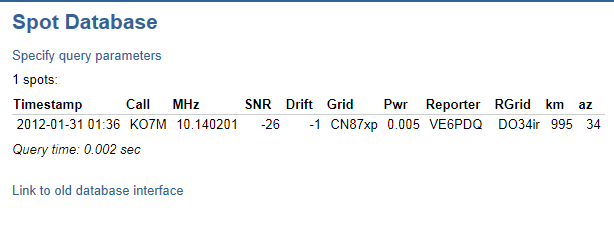
Well, I got my first WSPR spot on my propeller beacon today from VE6PDQ. It seems there is someone listening out there to my little peanut-whistle signal, blowing down all the competition with a thundering 5 mW (7 dBm) signal... :)
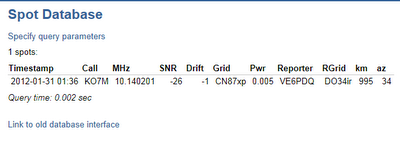 Whoo hoo! I was just about to give up hope of making any contacts on this low power level. That works out to about 199,000 km (123,652 miles) per watt if my fuzzy head is doing the math correctly. Yippee!

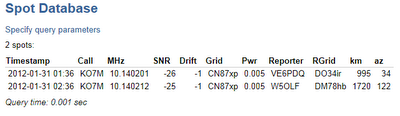
This works out to about 344,000 km (213,751 miles) per watt.


I barely had time to post this and I got a second spot from W5OLF at 1720 km. Seems that things are picking up for me. Very cool...
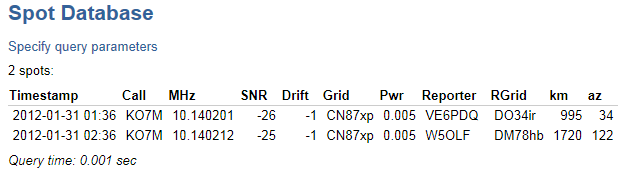
This works out to about 344,000 km (213,751 miles) per watt.

Saturday, January 28, 2012
Flying diversion
Flew up to Friday Harbor on San Juan Island yesterday in a Columbia 400, otherwise known as a Cessna 400 Corvalis.
Specifications (Cessna 400)
We landed at something above my normal cruise speed in the cub with a stiff crosswind and used every inch of the 3400 foot runway. I am used to landing at Friday Harbor and making the first turnoff.

Boeing field off the right wing whilst crossing over SeaTac International airport, climbing out of 4000 for 6000 feet.

Northbound crossing Puget Sound, punching through clouds as we go. Outside temperature was minus 13C and we were picking up some frost on the leading edges of the wings in the cloud tops.

Heading north, east of Puget Sound, north of Bremerton. Asked for 8000 feet to get above the cloud tops, but as you can see the clouds ahead are still above us. Didn't want to go much higher as we will just have to drop down through them again soon to land.

This is the Avidyne glass panel setup in the C400. Two Garmin GPS units, S-Tec autopilot and all the bells and whistles you can possibly want.
It was a fast trip and I enjoyed it greatly. I am certainly glad I was not alone as cruising at 185 knots rather than my normal 85 knots, things happen a whole lot quicker that I am used to. If you want to get someplace in a hurry, the C400 is a good way to go.
Specifications (Cessna 400)
Data from Columbia 400 Pilot's Operating Handbook
General characteristics- Crew: 1 pilot
- Capacity: 3 passengers
- Length: 25 ft 2 in (7.67 m)
- Wingspan: 36 ft 1 in (11.0 m)
- Height: 9 ft 0 in (2.74 m)
- Wing area: 141 ft² (13.1 m²)
- Empty weight: 2,500 lb (1,134 kg)
- Max. takeoff weight: 3,600 lb (1,500 kg)
- Powerplant: 1 × Teledyne Continental TSIO-550-C flat-6 engine, 310 hp (230 kW)
- Maximum speed: 235 knots (270 mph, 435 km/h) calibrated airspeed
- Cruise speed: 235 knots (270 mph, 435 km/h) true airspeed at 25,000 ft (7,600 m)
- Range: 1,107 nm (1,274 mi, 2,038 km)
- Service ceiling: 25,000 ft (7,600 m)
- Rate of climb: 1,500 ft/min (7.6 m/s) or greater, below 16,000 ft (4,875 m)
- Wing loading: 25.5 lb/ft² (125 kg/m²)
- Power/mass: 0.091 hp/lb (150 W/kg)
We landed at something above my normal cruise speed in the cub with a stiff crosswind and used every inch of the 3400 foot runway. I am used to landing at Friday Harbor and making the first turnoff.

Boeing field off the right wing whilst crossing over SeaTac International airport, climbing out of 4000 for 6000 feet.

Northbound crossing Puget Sound, punching through clouds as we go. Outside temperature was minus 13C and we were picking up some frost on the leading edges of the wings in the cloud tops.

Heading north, east of Puget Sound, north of Bremerton. Asked for 8000 feet to get above the cloud tops, but as you can see the clouds ahead are still above us. Didn't want to go much higher as we will just have to drop down through them again soon to land.

This is the Avidyne glass panel setup in the C400. Two Garmin GPS units, S-Tec autopilot and all the bells and whistles you can possibly want.
It was a fast trip and I enjoyed it greatly. I am certainly glad I was not alone as cruising at 185 knots rather than my normal 85 knots, things happen a whole lot quicker that I am used to. If you want to get someplace in a hurry, the C400 is a good way to go.
Friday, January 27, 2012
New Propeller Toys
I have obtained a touch panel LCD display for my Propeller board. I am using a modification of the TV object to display text output for debugging purposes. It is nice to have this peripheral display to make debugging easier. Here is some debug output from my work on a routine to encode WSPR messages:

Nice little display. It is a 320x240, 2.4" Colour LCD with touch screen. It mounts to a prototyping board and leaves 15 IO available when connected in 8 bit mode. It can display true-colour, 24 bit images and has a controllable backlight. It also sports a full size SD card slot that can be used for offline storage. Here is an example of the graphics display.

I think this will prove to be quite useful in my projects.

Nice little display. It is a 320x240, 2.4" Colour LCD with touch screen. It mounts to a prototyping board and leaves 15 IO available when connected in 8 bit mode. It can display true-colour, 24 bit images and has a controllable backlight. It also sports a full size SD card slot that can be used for offline storage. Here is an example of the graphics display.

I think this will prove to be quite useful in my projects.
Wednesday, January 25, 2012
7x14 Hellschreiber Glyphs
I noticed that Mark Vandewettering, K6HX over at brainwagon.org recently posted an arduino Hellschreiber bit of code and decided to adapt his 7x14 set of glyphs to QRSS on the Propeller processor.
The result is not displeasing, but is a bit more bandwidth that I would feel comfortable taking up of a QRSS band that is only 100 Hz wide in the first place.

This is with 2 Hz spacing between column dots. I reduced this to 1 Hz and got the following results:

Ok, so this is a little more bandwidth friendly, but I would need to play with the inter-column and inter-character spacing a bit to be happy with it. I am not totally sold on the set of glyphs yet, but the enlarged characters allow for more interesting glyphs to be created than with my original 5x7 set.
The result is not displeasing, but is a bit more bandwidth that I would feel comfortable taking up of a QRSS band that is only 100 Hz wide in the first place.

This is with 2 Hz spacing between column dots. I reduced this to 1 Hz and got the following results:

Ok, so this is a little more bandwidth friendly, but I would need to play with the inter-column and inter-character spacing a bit to be happy with it. I am not totally sold on the set of glyphs yet, but the enlarged characters allow for more interesting glyphs to be created than with my original 5x7 set.
Tuesday, January 24, 2012
Propeller Beacon Power Consumption
I decided to take a look at power consumption during RF generation on the Propeller device. I have a power monitoring device that logs current usage over time. What I wanted to see was the power consumption that was attributable to RF generation.
The test setup is a Gadget Gangster board powered by my power monitor at 4.55 volts. This is a somewhat low voltage, but is the highest voltage that it will generate. This of course may affect my testing results, but the data is interesting nevertheless.
Since I am measuring current usage on a running processor, it is fun to look at the effect of code changes on power usage, but that is a side topic for another time.
Baseline, I wanted to see what current consumption is when the processor(s) are waiting in a delay loop with RF generation off. This appears to be on the order of 20.8 mA while continuous RF generation on a single frequency appears to consume about 23.6 mA. The script who's power consumption is graphed below loops turning the RF on and off every 5 seconds.

Now, I replace the script with a CW beacon sending at about 15 WPM my call sign and locator (KO7M CN87). The power consumption graph looks very much like a QRSS Argo display.

As you can see, my call sign is clearly visible. This script baselines at about 22.5 mA with RF off and 25.2 mA with RF on or about 3-4 mA attributable to RF generation.
The test setup is a Gadget Gangster board powered by my power monitor at 4.55 volts. This is a somewhat low voltage, but is the highest voltage that it will generate. This of course may affect my testing results, but the data is interesting nevertheless.
Since I am measuring current usage on a running processor, it is fun to look at the effect of code changes on power usage, but that is a side topic for another time.
Baseline, I wanted to see what current consumption is when the processor(s) are waiting in a delay loop with RF generation off. This appears to be on the order of 20.8 mA while continuous RF generation on a single frequency appears to consume about 23.6 mA. The script who's power consumption is graphed below loops turning the RF on and off every 5 seconds.

Now, I replace the script with a CW beacon sending at about 15 WPM my call sign and locator (KO7M CN87). The power consumption graph looks very much like a QRSS Argo display.

As you can see, my call sign is clearly visible. This script baselines at about 22.5 mA with RF off and 25.2 mA with RF on or about 3-4 mA attributable to RF generation.
Monday, January 23, 2012
WSPR Spots
Well, my experience in running 7 dBm WSPR beacons thus far according to http://wsprnet.org has been far from stellar...
Specify query parameters
0 spots:
Query time: 0.001 sec
So, I think that I may move off 30 metres for this evening and have a go at one of the longer wave bands and see if I can improve the current score.
Spot Database
0 spots:
| Timestamp | Call | MHz | SNR | Drift | Grid | Pwr | Reporter | RGrid | km | az |
|---|
So, I think that I may move off 30 metres for this evening and have a go at one of the longer wave bands and see if I can improve the current score.
Subscribe to:
Posts (Atom)